Opens in a new tab
Blog❯
Business Central: Optimized user experience in the Web Client

Business Central: Optimized user experience in the Web Client

With the new spring versions of the Microsoft business applications, Business Central has also been…

     April 15, 2021

With the new spring versions of the Microsoft business applications, Business Central has also been enhanced and optimized. The general user-friendliness in the Web Client has been improved by some minor innovations as well.

In order to make it as easy and convenient as possible to use and to increase productivity at work, the usability of Business Central is improved with each new version through various optimizations.

Double-click a record in a list

For example, the first wave of releases in 2021 allows users to activate a single record quickly and easily in a list by double-clicking on it. This is possible if the list is displayed in row or tile form.

Double-clicking always triggers the default action for the record (e.g. drill down to the record’s detail card page). In a lookup dialog box, the dataset would be selected, and the dialog closed accordingly.

Although it is now possible to double-click in the empty space between record values, it is still possible to activate all hyperlinked values by simply clicking on them. When double-clicking on unlinked values, the respective text is selected for copying.
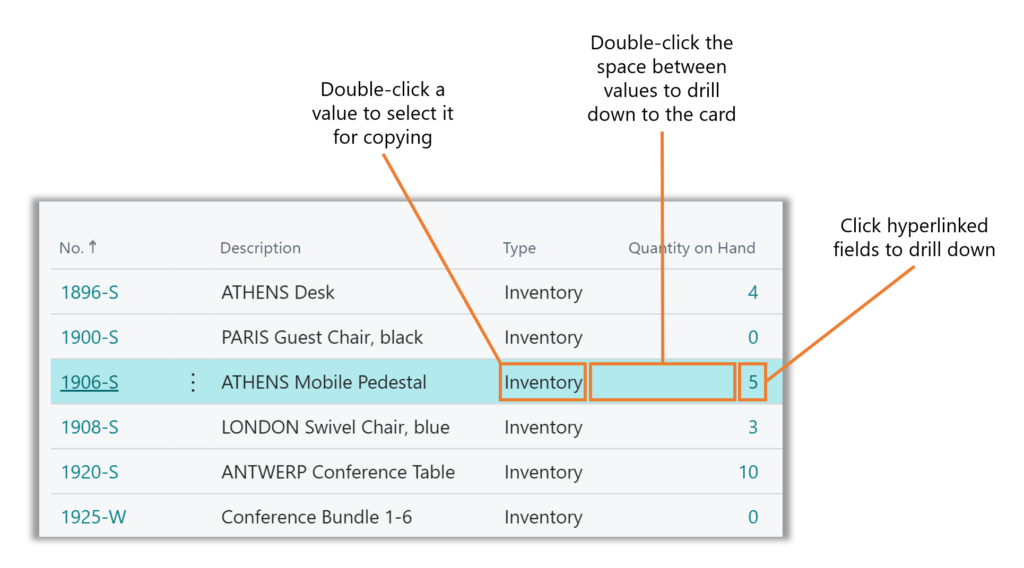
Business Central User Interface
Supported click and double-click functionalities in a list (Source: Microsoft)

Optimized user interface

Moreover, the desktop interface in the Web Client is now more responsive  and adapts automatically to the available space. This enables different screen resolutions, for example. Users with visual impairments can also work with an enlarged user interface. The embedding of the Business Central Web Client in small frames of other applications has also been improved.

Various enhancements have been introduced to implement the optimized user interface. For example, the Page Inspector pane can be collapsed, and page margins automatically shrink at reduced widths to display more content. Action buttons on report request pages and all dialog boxes are always visible and accessible. For fixed layout and grid layout controls, a horizontal scroll bar has also been added to prevent tabular values from being compressed.

Selecting all text when clicking in a field

In Business Central, some field values have been able to be quickly replaced for quite some time. This is possible because the entire field value is always selected as soon as the Tab or Enter key is used to focus on a field or select an editable cell in a list. With the new version, this functionality has now been extended to the remaining fields (where it was not possible before).

Business Central User Interface
Selection of the whole text when clicking into a field (Source: Microsoft)

Related Posts
Business Central 2026 Wave 2: Helpful new features for more user-friendliness
Enterprise Resource Planning
November 2, 2026

Business Central 2026 Wave 2: Helpful new features for more user-friendliness

With the latest release, Dynamics 365 Business Central has once again introduced new features and optimizations…
Read more
Qlik Cloud: New features for visualizations from the past few months
Business Intelligence
October 23, 2026

Qlik Cloud: New features for visualizations from the past few months

To enable comprehensive analyses and appealing visualizations, Qlik continuously expands the design capabilities on its platform.
Read more
PI Down Payments: Efficiently manage down payments in Dynamics 365 Business Central
Enterprise Resource Planning
October 16, 2026

PI Down Payments: Efficiently manage down payments in Dynamics 365 Business Central

Down payments are part of daily business operations at many companies – especially for projects and…
Read more
Business Central 2026 Release Wave 2: Microsoft rolls out this year’s fall release
Enterprise Resource Planning
October 8, 2026

Business Central 2026 Release Wave 2: Microsoft rolls out this year’s fall release

Within Business Central 2026 Release Wave 2, numerous new features and improvements have been available since…
Read more
Flexible Scheduling for Automations in Qlik
Business Intelligence
September 24, 2026

Flexible Scheduling for Automations in Qlik

In Qlik, automations ensure that recurring tasks are executed reliably and without manual effort. To enable…
Read more
Business Central 2026 Wave 1: Easier editing of Word report layouts
Enterprise Resource Planning
September 17, 2026

Business Central 2026 Wave 1: Easier editing of Word report layouts

With the latest version of Business Central, users can customize report layouts on their own, without…
Read more
Document Management System
Trends, technologies and strategies for digital transformation
View all
BlueBioTech International GmbH: prisma informatik brings a breath of fresh air to the software landscape and business processes
Document Management System, Enterprise Resource Planning
February 18, 2026

BlueBioTech International GmbH: prisma informatik brings a breath of fresh air to the software landscape and business processes

BlueBioTech International GmbH has teamed up with prisma informatik to take the plunge into the cloud…
Read more
Bayerische Zugspitzbahn Bergbahn AG: At the summit of the mountains and digitalization
Business Intelligence, Document Management System, Enterprise Resource Planning
August 28, 2025

Bayerische Zugspitzbahn Bergbahn AG: At the summit of the mountains and digitalization

As an extremely modern company, Bayerische Zugspitzbahn Bergbahn AG Garmisch-Partenkirchen (BZB) has been pursuing a comprehensive…
Read more