Opens in a new tab
Blog❯
Business Central: Add email attachments to records with the Outlook add-in

Business Central: Add email attachments to records with the Outlook add-in

With the release of the new spring version of Business Central, the functionalities of the…

     May 12, 2022

With the release of the new spring version of Business Central, the functionalities of the Outlook add-in have been extended again.

Many company workflows also involve files and documents. Those are usually needed to initiate a workflow or to be able to continue it successfully. Often, the email inbox in Outlook serves as the source for the corresponding incoming files, such as PDF invoices for payment, photos of damaged goods, customer requirements in Word documents or Excel lists with part specifications.

In the future, the Business Central add-in for Outlook will allow email attachments to be quickly and easily linked to the associated Business Central business processes without having to leave Outlook. Because the workflow does not have to be interrupted, the add-in increases efficiency and productivity and saves time.

Transfer email attachments directly to Business Central

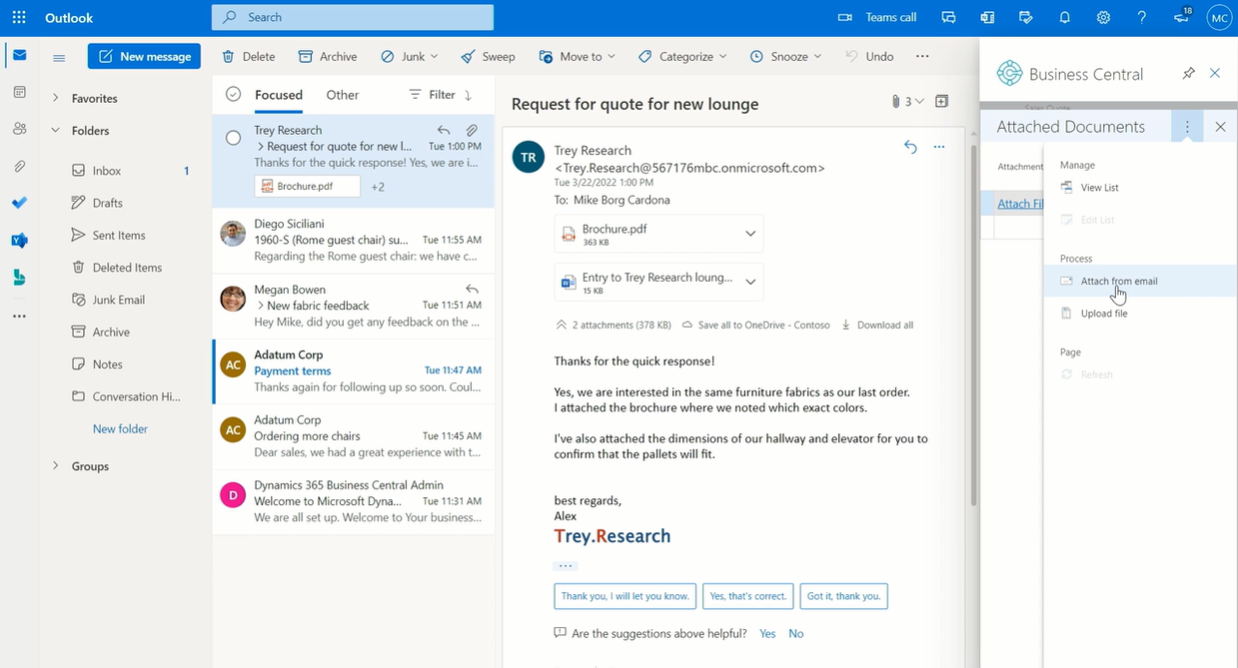
To this end, the Outlook add-in now offers the option of copying email attachments directly into the Business Central record displayed in the add-in area. For example, the add-in automatically displays the matching record for the email contact who sent the corresponding email with the attachment. From there, it is possible to navigate to the last order of the respective contact, for example. Once the corresponding order to which the e-mail refers has been identified, the attachments function can be used to copy files from the current email to this order.
Business Central Outlook add-in
Outlook add-in in the email inbox with the option to copy attachments directly to Business Central (Source: Microsoft)

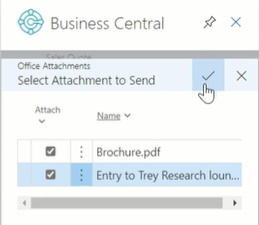
The new functionality of the Outlook add-in makes it possible to select either individual or all attachments of an email at the same time and add them to the data record.
Business Central Outlook add-in
Possibility to select multiple attachments to send/copy at the same time (Source: Microsoft)

Once a file is added, others can immediately download and view it out of the Attachments FactBox in any Business Central client. The files can also be opened in OneDrive to share and collaborate with the department. The feature is available for all records that use the “Attachments” FactBox (e.g. vendors, customers, purchase invoices or sales orders). Alternatively, the “Send to Incoming Documents” function can be used to process incoming invoices.

Because the view in the Outlook add-in is quite limited in space, the displayed record can also be opened in a popout window for more detailed editing. From there, it can also be shared with others via Microsoft Teams or a link by using the corresponding buttons.

Business Central Outlook add-in
Business Central popout window, which can be opened via the Outlook add-in (Source: Microsoft)

This creates a full collaboration experience between Business Central and other Microsoft applications such as Outlook or Teams, without having to leave the application you are currently using.

Related Posts
Business Central 2026 Wave 2: Helpful new features for more user-friendliness
Enterprise Resource Planning
November 2, 2026

Business Central 2026 Wave 2: Helpful new features for more user-friendliness

With the latest release, Dynamics 365 Business Central has once again introduced new features and optimizations…
Read more
Qlik Cloud: New features for visualizations from the past few months
Business Intelligence
October 23, 2026

Qlik Cloud: New features for visualizations from the past few months

To enable comprehensive analyses and appealing visualizations, Qlik continuously expands the design capabilities on its platform.
Read more
PI Down Payments: Efficiently manage down payments in Dynamics 365 Business Central
Enterprise Resource Planning
October 16, 2026

PI Down Payments: Efficiently manage down payments in Dynamics 365 Business Central

Down payments are part of daily business operations at many companies – especially for projects and…
Read more
Business Central 2026 Release Wave 2: Microsoft rolls out this year’s fall release
Enterprise Resource Planning
October 8, 2026

Business Central 2026 Release Wave 2: Microsoft rolls out this year’s fall release

Within Business Central 2026 Release Wave 2, numerous new features and improvements have been available since…
Read more
Flexible Scheduling for Automations in Qlik
Business Intelligence
September 24, 2026

Flexible Scheduling for Automations in Qlik

In Qlik, automations ensure that recurring tasks are executed reliably and without manual effort. To enable…
Read more
Business Central 2026 Wave 1: Easier editing of Word report layouts
Enterprise Resource Planning
September 17, 2026

Business Central 2026 Wave 1: Easier editing of Word report layouts

With the latest version of Business Central, users can customize report layouts on their own, without…
Read more
Document Management System
Trends, technologies and strategies for digital transformation
View all
BlueBioTech International GmbH: prisma informatik brings a breath of fresh air to the software landscape and business processes
Document Management System, Enterprise Resource Planning
February 18, 2026

BlueBioTech International GmbH: prisma informatik brings a breath of fresh air to the software landscape and business processes

BlueBioTech International GmbH has teamed up with prisma informatik to take the plunge into the cloud…
Read more
Bayerische Zugspitzbahn Bergbahn AG: At the summit of the mountains and digitalization
Business Intelligence, Document Management System, Enterprise Resource Planning
August 28, 2025

Bayerische Zugspitzbahn Bergbahn AG: At the summit of the mountains and digitalization

As an extremely modern company, Bayerische Zugspitzbahn Bergbahn AG Garmisch-Partenkirchen (BZB) has been pursuing a comprehensive…
Read more